Tag: security

  • Road to CCNP: Day 108 (BGP)

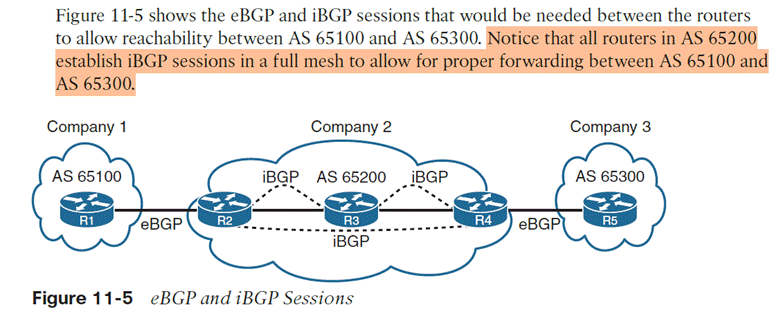
    3.2.c Configure and verify eBGP between directly connected neighbors (best path selection algorithm and neighbor relationships)

    Two routers can form a BGP peering relationship if they have working IP reachability to each other and the BGP session parameters match.

    1. Create the eBGP process
      1. Router bgp [process-id]
    2. Statically assign routing ID
      1. Bgp router-id [router-id]First choice is any up loopbac
      1. Then any up interface
    3. Identify the link’s neighbor
      1. Neighbor [ip] remote-AS [remote-AS #]
      1. Applies to both internal BGP and external BGP, meaning even if the neighbor is within your own AS you still have to use the command
    4. Define the network to advertise (much like rip or ospf)
      1. Network [network address] mask [subnet mask]
      1. Means if I have an interface that’s UP within this network and mask, I want that interface and its network to be advertised in this routing protocol
    5. Initialize address family with command
      1. (router-config-bgp)# address-family []
    6. Activate for the neighbor with
      1. neighbor [ip-address] activate

    Multiprotocol BGP = MBGP = allows IPv4 and IPv6 to coexist on the same device and routes are not shared, with the same BGP process

    Verification of BGP

    • show ip bgp summary = came out before multiprotocol
    • show bgp [ipv4/ipv6] summary

    BGP Session States
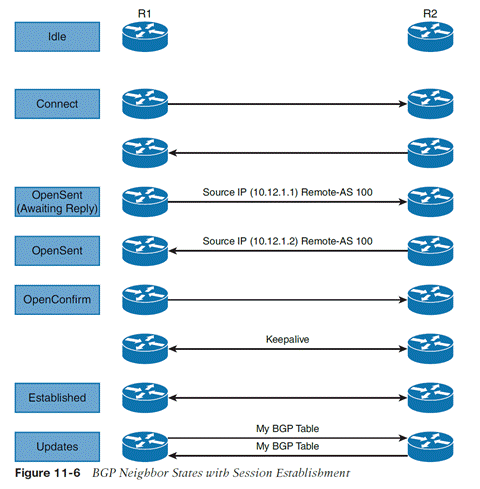
    1. IDLE = sitting there doing nothing
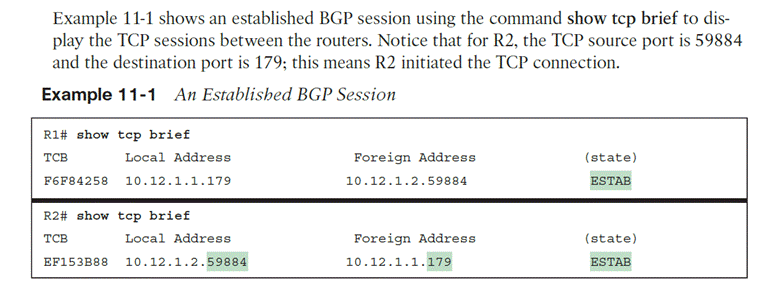
    2. Connect = each side initiates TCP connections with each other using TCP port 179. Three-way handshake Routers always listen on port 179 for connection requests but the source port is ephemeral. That means the first router to initiate the connection is the one with source port random high number.
    3. Active = first connection is open and active. BGP starts a second TCP connection and keeps it open for 4 minutes. The next step is OpenSent, which remains until the timer reaches 0.
    4. OpenSent = R1 sends an Open message to R2. Upon receipt, R2 will send an Open message back. Once both routers receive an open message, they do CRC check and check BGP configurations, which must match. Open messages contain info about the source router configuration.
      1. BGP versions must matchSource IP address of Open msg
      2. must match that of the neighbor commandRID’s must be exist and be unique.
      3. must match that of the neighbor commandAS number in the Open msg.
    5. OpenConfirm = If the Open messages have no errors, a KEEPALIVE is sent and the hold timer is reset and status enters OpenConfirm.
    6. Established = Upon each router receiving a KEEPALIVE, they enter Established. BGP session is initiated. Route information is exchanged in the Update message type. KEEPALIVES are sent to keep Established open.

  • Road to CCNP: Day 102

    %       4.0         Network Assurance


    4.1                  Diagnose network problems using such as debugs, conditional debugs, traceroute, ping,

    SNMP, and syslog

    Ping, traceroute, debug command, make access lists to filter better, undebug all command to remove all, syslog


    4.2       Configure and verify Flexible NetFlow

    Capture statistics on who talked to who, how they did, and how much

    Statistics available per host

    Conf t, ip flow-export version #, flow-export destination [IP]

    Navigate to interface, ip flow egress, ip flow egress

    Show ip flow interface, export, show ip cache flow, ip flow-top-talkers (why the hyphen LOL>??)

    WHO talked to WHO, HOW, and HOW MUCH


      4.3        Configure SPAN/RSPAN/ERSPAN

    Same switch, SPAN = Switched Port Analyzer, connect to and configure the switch to duplicate the traffic to another interface

     Remote different switch, RSPAN = Remote Switched Port Analyzer, remote switch sends traffic back to local switch, same layer 2 domain, basically source and destination ports can be on different switches. Send RSPAN traffic over RSPAN vlan. On source switch, Source is interface, destination is remote vlan [number]. Reverse is true for the destination switch.

    Make sure you hit the “remote-span” command on vlan configuration mode

    Remote different device ERSPAN = Encapsulated Remote Switched Port Analyzer, remote device captures and then encapsulates using GRE back to the local network

    Switch(config)# monitor session [number] source interface [interfaces
    Switch(config)# monitor session [ number] destination interface [interface SPAN device is connected to]
    switch#Show monitor session [number]  

                   4.4       Configure and verify IPSLA

    Service provider SLA tracking only provides SLA information within their network. You can use Cisco IPSLA to measure end-to-end SLA. Works as a constant steady stream of ICMP pings (or HTTP messages, if configured that way), measuring specific stats

    • Delay (round trip and one way)
    • Jitter (per direction)
    • Packet loss (per direction)
    • Packet sequencing (fragmented packets arriving in order?)
    • Path
    • Connectivity (per direction)
    • website download time
    • voice quality scores

    5.4       Describe the components of network security design

                                  5.4.a     Threat defense

                                  5.4.b    Endpoint security

                                  5.4.c     Next-generation firewall

                                  5.4.d    TrustSec and MACsec

    Trustsec= apply rules by security group – devices and users are joined to groups, and these groups are used to make policies (eg guest cannot connect to anything NOT guest)

    MACsec aka 802.1AE = layer 2 traffic is only encrypted as it travels, and not in the switch. This allows inspection of the payload itself inside the switch

    Downlink MACsec = encryption of layer 2 traffic between an endpoint and a switch (requires both devices to be MACsec capable. Devices can be configured with ISE or manually per port

    Uplink MACsec = encryption of layer 2 traffic between switches